ADDING A VIDEO
Important Note: Videos can not be hosted on your My Surgery Website however you can upload them to YouTube or similar and then embed them into your site. If you have your own video that you wish to place on your website then you must upload it to Youtube or similar first and then follow these instructions.
In the editing area place the cursor where you would like the video to appear.
Click the INSERT VIDEO button.

The following options will appear

Copy the Youtube link for your video from the address bar.

Paste your link in the source field as below:
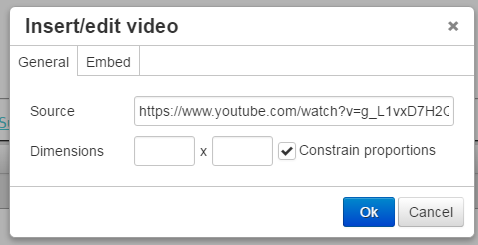
Set the size you would like your video to appear using the dimensions fields. As a rule 400 to 500 pixels in width (the first value) is a good size. Leave the second field empty and make sure Constrain proportions is ticked and the height will be set automatically.
Click OK and the video will be inserted.
You must SAVE the webpage in the editor before the changes will show.