How do I add a wiki page?
Please note: this article is only applicable to websites built after November 2018.
This article will show you how to create a wiki page on your website.
In this article:
- Considerations/Prerequisites
- Detail
- Dos and Don’ts
- Common Problems/Mistakes
- Common Questions/FAQs
- Related Articles/See Also
Considerations/Prerequisites
Wiki pages are powered by NHS content and are not editable. They draw content directly from the NHS so update when the NHS updates its content.
Detail
- Open the Page Manager by clicking the grey arrow icon in the top left and corner. A side menu will appear. The Page Management tools are found under the green section.
- In the sidebar list go to the Page Management section (highlighted green) and click Manage Pages. A new sidebar window will open.
- Click the "+ New Page" button.
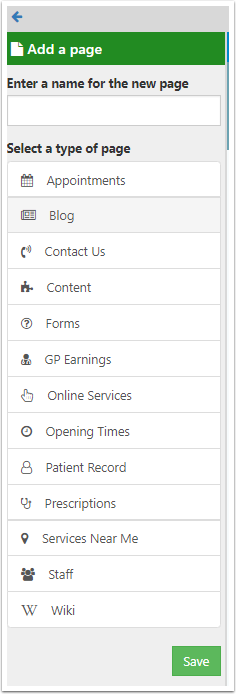
- Enter a name for the new page in the field that appears.
- Under Select a type of page scroll to the bottom and select Wiki. Click “Save” to create the new page.
- Your new page will open in the main window.
- Hover over the Wiki widget and click the EDIT link that appears.
- A new sidebar will open. Select a topic from the drop-down list and click Save.
- Your new page will automatically be populated with NHS content.
Dos and Don’ts
- Ensure the page is appropriately named.
Common Problems/Mistakes
Common Questions/FAQs
Why can’t I find the page on my website in normal view?
The page will need to be linked to a menu. See Menu Manager Overview.
Related links/See Also
How to add a new page
Page Manager Overview
Menu Manager Overview
Keywords/meta tags
content, health, information, NHS, self help, advice